
Fall Session:
November – December 2026
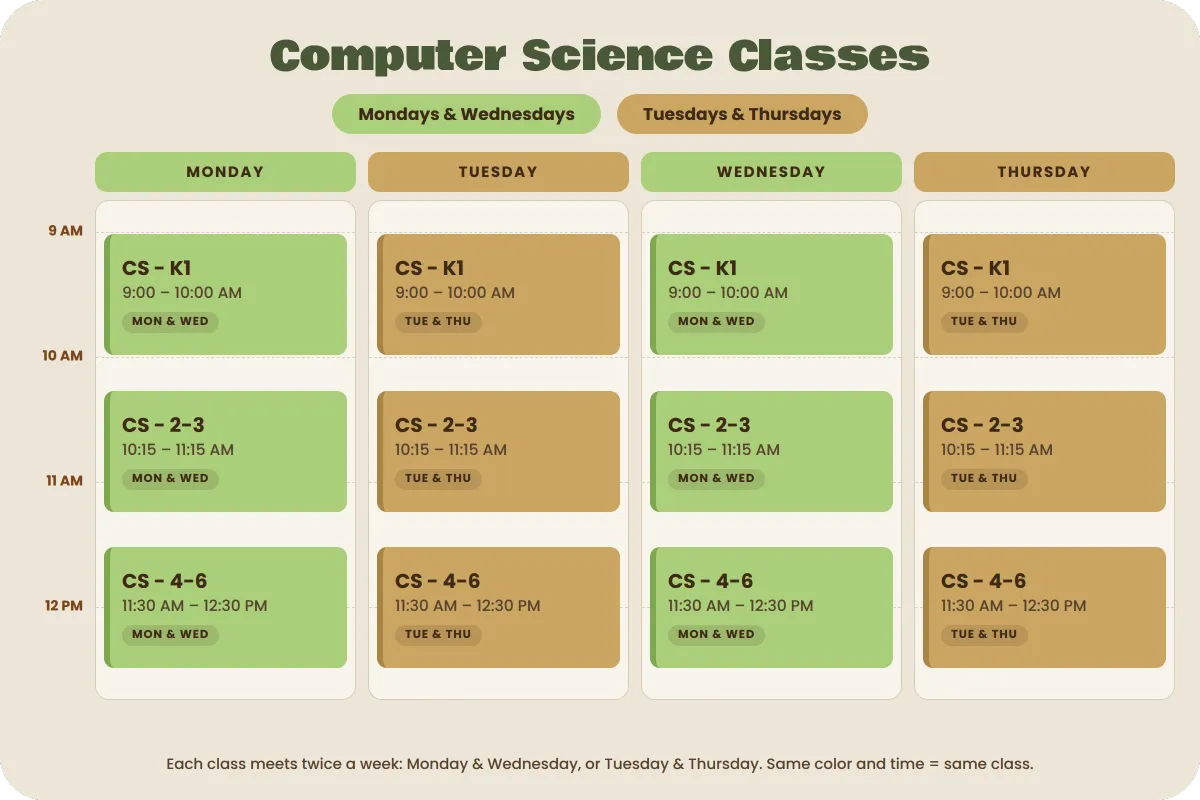
This session includes 6 classes
K–1st Grade | Beginning Computer Science & Robotics
Students are introduced to computer science through icon-based programming and hands-on building. Using ScratchJr, students learn sequencing, commands, loops, and problem-solving while creating and programming their own simple games and animations.
Students will also explore LEGO robotics using age-appropriate icon programming to build, test, and program simple robots.
What Students Will Do
Each class includes guided, hands-on activities where students:
Learn beginning programming concepts using visual icons
Create simple games and animations with ScratchJr
Build and program LEGO robots
Explore sequencing, loops, commands, and debugging
Complete hands-on robotics challenges
Develop creativity, problem-solving, and computational thinking
2nd–3rd Grade | Computer Science & Robotics
Students progress from icon-based programming into block-based coding while continuing hands-on LEGO robotics and design challenges.
Students will use a combination of ScratchJr and Tynker to create simple video games while learning programming concepts. LEGO robotics projects introduce students to block-based programming, robotics design, sensors, and engineering challenges.
More importantly, it helps them build confidence in their ability to learn and create.
What Students Will Do
Program LEGO robots using block-based coding
Design, build, test, and improve robotic creations
Use ScratchJr and Tynker to create simple video games
Learn sequences, loops, events, conditions, and debugging
Solve engineering and robotics challenges
Begin connecting coding to real-world technology
4th–6th Grade | Computer Science, AI & Robotics
Students take their programming and robotics skills further through block-based programming, LEGO robotics, AI concepts, game development, and engineering challenges.
Students will use LEGO robotics as a primary platform for learning computer science while incorporating Tynker for video game development. Hands-on electronics projects with littleBits and Makey Makey allow students to connect computer programming to physical circuits and interactive creations.
What Students Will Do
Use block-based programming to control LEGO robots
Design, build, program, and troubleshoot robots
Complete increasingly complex robotics challenges
Use Tynker to design and program simple video games
Explore introductory AI concepts through LEGO-based projects
Create circuits and interactive inventions using littleBits
Use Makey Makey to turn everyday objects into computer controls
Practice engineering design, iteration, debugging, and problem-solving

Jo-Botics empowers students through hands-on robotics, coding, and creative STEM learning, designed to build confidence and future-ready skills.
Location
Robotics
© Copyright 2026 Jobotics. All Rights Reserved.